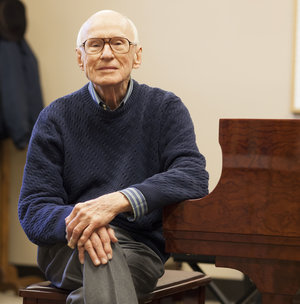
I have always respected Dr. Hinson’s work and his music. So much so that I went to Connecticut to take a class on Piano Pedagogy with him several years ago. I have also attended several local piano teacher workshops with him. At one of them, he claimed to remember me from that Connecticut class. Whether true or not, I treasure that comment and the signature on a piano book he gave me.
We have several of his books at the O’Connor Music Studio and many are available for loan. If you are interested in buying any for yourself, amazon.com has a great selection. In addition to those books he has authored, he has edited the works of many composers. Amazon lists 270 works edited and annotated by Dr. Hinson.
From his page on alfred.com:
One of America’s most respected authorities on piano literature, Dr. Maurice Hinson received the Lifetime Achievement Award from the Music Teachers National Association at its Washington, D.C. convention in the spring of 1994, the Outstanding Alumni Award from the University of Florida in 1990, and the Outstanding Alumni Award from the University of Michigan in the fall of 1995. Hailed as a specialist in American piano music, some of his articles appear in the New Grove Dictionary of American Music in the United States.
Dr. Hinson received his Bachelor of Arts degree from the University of Florida and his Master of Music and Doctor of Musical Arts degrees from the University of Michigan. He also studied at The Juilliard School and the Conservatoire National in Nancy, France.
While a Senior Professor of Piano in the School of Church Music at the Southern Baptist Theological Seminary in Louisville, Kentucky, Dr. Hinson’s curriculum included teaching piano, piano literature, and piano chamber music. He performed, lectured, and gave masterclasses worldwide. His books and editions have become classic standards in the studios of serious piano teachers and students the world over.
From his obituary at legacy.com:
Hinson, Dr. G. Maurice, age 84 died November 11, 2015 in the company of his family. Dr. Hinson was Professor and Senior Professor of Piano at the Southern Baptist Theological Seminary from 1957 to 2015, and a member of Broadway Baptist Church. He was also organist-choirmaster of churches in Florida, Michigan and Kentucky from 1943 to 1980. Dr. Hinson received his BA degree from the University of Florida and his MM and DMA degrees from the University of Michigan, and also studied at The Julliard School and the University of Nancy, France (Conservatoire National).
He was the first president of the Greater Louisville Music Teachers Association, and president of the Kentucky Music Teachers Association as well as the Southern Division of the MTNA. He also taught “The Dorsey Class,” a group of selected piano teachers from 1963 to 2015.
Dr. Hinson is the author of 14 books mostly published by Indiana University Press, plus over 100 articles for music publications. He was a senior editor for The Alfred Publishing Company of California. He edited more than 300 editions of classical piano music and recorded five DVDs of piano music.
As Professor of Piano at the Southern Baptist Theological Seminary for 58 years, he taught and nurtured many pianists who now hold distinguished positions in churches and universities throughout the world.
Dr. Hinson received many awards in piano pedagogy and performance. He was awarded the Liszt Commemorative Medal by the Hungarian Government and the Medal of Excellence by the American Liszt Society for his research on the music of Franz Liszt. He was hailed as a specialist in American Piano music and some of his most recent articles appeared in the NEW GROVE DICTIONARY OF AMERICAN MUSIC. He gave recitals, lectures, and master classes in five continents and 50 states.
Hinson was the founding editor of the JOURNAL OF THE AMERICAN LISZT SOCIETY, past editor of THE AMERICAN MUSIC TEACHER, and contributing editor of THE PIANO QUARTERLY and PIANO AND KEYBOARD.