Now and then, our studio gets asked if we offer bi-weekly lessons. I mean, doesn’t it make sense that if you take lessons every other week, you have half the number of trips into the studio, you have double the amount of time to practice, and you can save some money, right?
WRONG.
Aside from the fact that it is a scheduling nightmare for the teacher and studio, I want to outline a few reasons why (in most cases) bi-weekly lessons do not work.
What Will Happen If Schools Close In Fairfax County?
Piano lessons will continue because we have a plan!
Please note that I clean the piano and keyboard keys with Clorox wipes between each student.Students are expected to wash hands before lessons and after using the restroom. Hand sanitizer is available.
I am continuously monitoring press releases from public health officials both locally and nationwide and have developed a plan for continuity in piano lessons should we need to implement it.
If any of the school districts that students in our studio attend close down or the health department provides suggestions to more seriously limit interaction and engage in social distancing, piano lessons will continue for students of ALL ages.
Our contingency plan if Fairfax County Schools close is to:
Close the physical studio temporarily
Provide online lesson options completely customized towards each student using an app/website called Tonara.All students have been assigned user names and passwords already.Your log-in information is in your student’s notebook or I will send it to you.
All assignments are due by the beginning of the student’s regularly scheduled lesson time and new ones along with comments about the past week will be given during the regular lesson time. Students will still be expected to continue practicing, completing all assignments and demonstrating progress.
We started using Tonara March 11, 2020 for assignments so that students will be accustomed to it is needed for real. https://youtu.be/eFCaRZhRKm4
There will be assigned theory games using an app called SproutBeat.You can download this in the app store. All students have been assigned user names and passwords already.Your log-in information is in your student’s notebook or I will send it to you.
There may be assigned theory games using a website called SproutBeat Leap.You use it in a browser window at https://leap.sproutbeat.com/home . All students have been assigned user names and passwords already.Your log-in information is in your student’s notebook or I will send it to you.
There may be written theory work from your assigned theory bookIf so, please take a picture of it in Tonara and upload it along with other assignments.It could also be scanned and emailed to maryoconnor@gmail.com
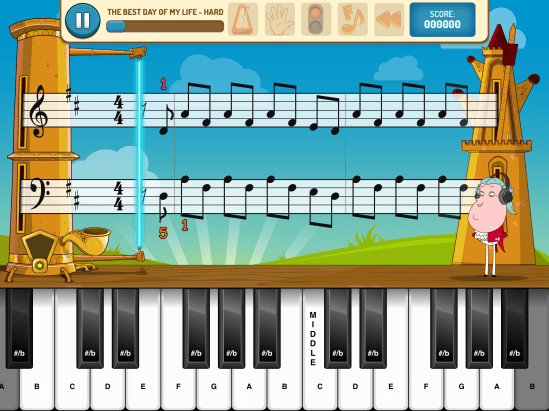
For students with iPads, please be sure that you have downloaded PianoMaestro.There will be weekly assignments listed under “Home Challenge”.Please try to get 3 stars.It is possible to slow the pieces down but you may lose points/stars doing so.If it’s really hard, try the Learn Mode.
For students without iPads, I will assign at least one or two pieces to be videoed in the Tonara app/website and submitted to me for feedback.These will be due by the beginning of the student’s regularly scheduled lesson time and new (or review) ones will be given during the regular lesson time. Feedback will also be provided during the scheduled lesson time.
Depending on how long school is canceled, we may have online lessons using StreamYard as a virtual piano studio during the regularly scheduled lesson time.I will create a ‘broadcast’ for the day and send the same link to all my students.When a student clicks in I see them “backstage” and add them to the lesson, so we can both see/hear each other.Then when the lesson is over the next one has already arrived.I click that one through and the 3 of us are there for a minute. they say hello/goodbye just like in a live lesson.
Other Apps you might want to try at home:
Theory: Music Theory Pro – a great tool for preparing for auditions: scales, chords, intervals and more
Theory: Jungle Journey
Rhythm: Rhythm Swing – a fun, interactive game that covers basic note values
Rhythm: Rhythm Lab – assign rhythms for students to practice and tap- hands alone or together
Rhythm: Rhythm Cat
Note-Reading: Flashnote Derby – a customizable game where students ‘race’ to select the correct note
Note-Reading: Note Squish: think whac-a-mole with notes. Also customizable by clef (includes alto clef!)
Note-Reading: Noteworks
Note-Reading: Staff Wars
Note-Reading: Note Rush:great for keyboard geography. Students have to play the note that pops up
Note-Reading: Treble Cat
Note-Reading: Bass Cat
Ear Training: Beat Melody – great intro to ear training
Ear Training: Ear Cat
Your payment will still be due at the same time. All assignments are due by the beginning of the student’s regularly scheduled lesson time and new ones along with comments about the past week will be given during the regular lesson time. Students will still be expected to continue practicing, completing all assignments and demonstrating progress.
If you have an underlying health concern or family member who has one that you believe puts you in a high-risk group and you would like to take steps ahead of time to mitigate your exposure, please let me know and I will set up online lessons for you (see #10 above).
I have purchased a set of Christmas Shades of Sound Listening & Coloring Book for the studio.
Please let me know if you do not want your student to participate in Christmas activities and I will assign alternate activities.
Each week, I will print out some of the pages for your student and put them in his/her notebook. After listening to the music on YouTube, the student may color the pages.
After they are colored, please return them to the notebook so that there will be a complete book when finished.
If you are an adult and want to listen and color, too, just let me know and I’ll print you a set.
Get your piano students listening to great classical music!
The Shades of Sound Listening and Coloring Books are a great way to encourage students to listen to great piano and orchestral repertoire. Students of all ages will love coloring the fun pictures while listening to and learning from the music of the great composers.
This Shades of Sound Christmas edition includes 20 pieces of piano and orchestral literature for the Christmas season, from the Baroque to the Modern period. Includes background and historical information on the pieces and the composers, and a beautiful coloring page for each piece.
The Christmas Shades of Sound book includes 20 different pieces, including:
In Dulci Jubilo from the Christmas Tree Suite by Liszt
Today, since it’s a “teaching day”, I’m thankful for my piano studio, my students, and my piano 🙂
When I was growing up, my dad was a minister, meaning we lived in whatever parsonage the church chose to let us live in. The one we had in Pawcatuck, CT had an upright piano that someone had put out in the sunroom. Not the best place for a piano, but I digress.
Since we had the piano already, someone – probably my mom – decided that I would take lessons. We had the organist from the Baptist church just across the river in Westerly, RI
Apparently, Clara Pashley was fondly remembered at the church (now Central Baptist Church) since she was mentioned in an article from 2010.
Miss Pashley walked to our house each week and taught me (and my mom who was always listening in) piano for the grand sum of 25 cents.
I started with Ada Richter’s classic Teaching Little Fingers to Play, which has now been morphed into the John Thompson library.
From there, it was the Michael Aaron series, and some sheet music.
There was no music store in our town, so I have no idea where any of this music came from – but I still have it all.
My parents did very well for their quarter a week investment, especially since my mom paid good attention and was able to beef up lessons she’d had as a child. Later on, she played well enough that she was church organist for a local Roman Catholic Church.
But I digress…
In those days, kids couldn’t do a whole lot of activities, so in 6th grade, I decided I wanted to be a Girl Scout. Bye, bye Clara.
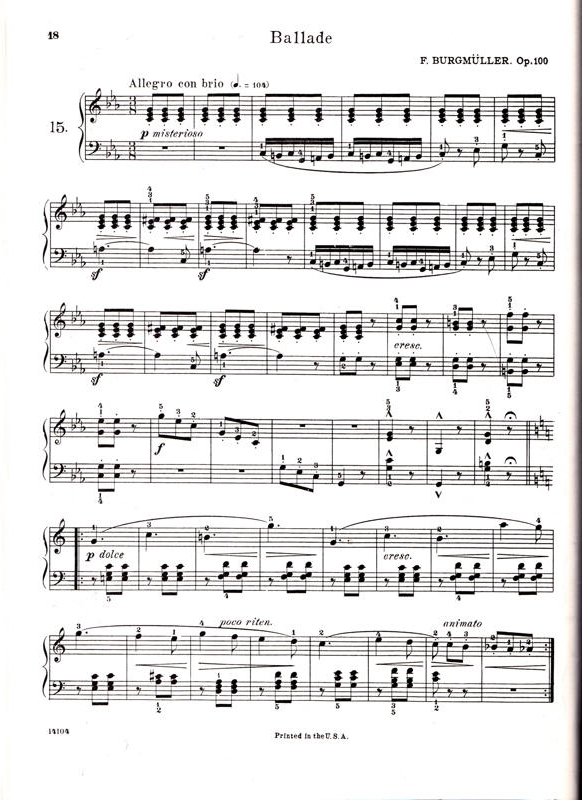
Girl Scouts didn’t last long but I did play piano in a talent show. I remember, I carefully cut Burgmüller’s Ballade out of my Michael Aaron book and made a nice construction paper cover. (I still have this, too)
I doubt that I played this well but here’s what it was supposed to sound like:
A few years intervened and we moved to Springfield, MA. The parsonage piano there was in terrible shape and in the dark, never-used basement. But I decided to make it mine and cleared up the area around it and started “practicing”.
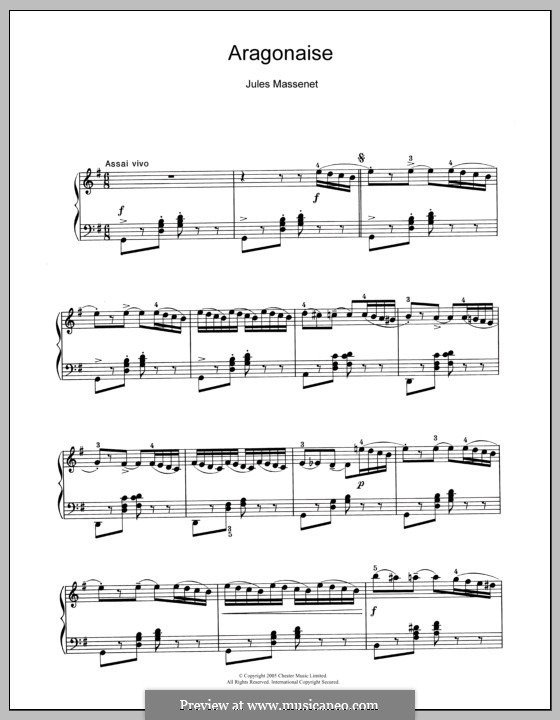
My Junior or Senior year of High School I decided I wanted to major in music in college. I decided to learn, on my own, a piano arrangement of Aragonnaise by Jules Massenet. I have no idea why or where that sheet music came from but I started working furiously on this piece.
Hopefully, at some point, it should have sounded like this:
I started pedaling (no pun intended!) my music to the Universities of Connecticut and Massachusetts and ended up at UMass Amherst since we were state residents.
Early morning gym classes (usually swimming), then wet hair traipsing across campus to music theory in winter 5 days a week. AARRGGH!
But I stuck it out.
My wonderful piano teacher, Howard Lebow, was killed in a car accident my sophomore year and I was devastated. There was about him in a post on January 26, 2018 here: https://atomic-temporary-44596882.wpcomstaging.com
I took yet another break from piano lessons – but I kept playing.
After DH graduated, we moved to Milwaukee, WI for his graduate school. Besides working 2 jobs, I found time to commandeer the practice rooms at the University of Wisconsin. I also found a teacher at the Schaum School of Music. She was amazed that I had no piano at home to practice on.
When we later moved to Alexandria, VA my DH gave me a choice of new car or piano. So, I found a used piano. The owner had acquired it in a divorce and wanted it gone. Yesterday. She even paid to move it out of her apartment.
The new-to-me piano took up half our living room. When my parents came to visit, their feet were under my piano as they slept on cots.
I found yet another new piano teacher and she is still my best friend to this day.
That piano moved to several locations before I bought a brand new Yamaha grand piano. The movers accidentally brought in the wrong one and I made them return it. The people who lived in an apartment were probably unhappy when they had to return my piano and take their own new baby grand back.
I started teaching as a traveling piano teacher in Silver Spring, Maryland. I continued that in Wilmington, DE.
When we got to Fairfax, VA I decided no more traveling. Students would come to me. And so they have since 1973.
What is supposed to be our living room is filled with music books, electric keyboards, the grand piano, 2 organs, 2 violins, 2 clarinets, a hand-made (by me!) dulcimer and other musical “stuff”.
Piano playing has gotten me through the worst times of my life. Teaching has been a lifeline for me, as well.
I am so thankful for the students who have stayed with me over the years.
These collectible cards will excite and motivate your beginning students. Your student will get one when they complete a task or accomplish a goal in their musical journey! Each level has fifty-four achievement cards. There are enough for the whole year.
Bravo Badges are designed to be eye-catching. Your students will love showing off their collection.
When the next levels become available, intermediate students will be able to collect these, as well.
It will be fun watching your child improve their piano skills all while having fun using Piano Maestro in lessons each week!
As your child’s teacher (or YOUR teacher!), I’m looking forward to seeing the progress they will make when they start using it at home each day. This guide will help you understand how this app will benefit your child and how to get it set up on your own iPad.
Overview What is Piano Maestro?
Piano Maestro is the ultimate piano practice tool that will have students quickly playing their favorite classical, pop, rock, TV and video game songs and themes. It is available in the App Store and works on the iPad.
What skills does it improve?
• Note reading
• Sight reading
• Rhythm
• Inner pulse
• Confidence
What makes it so fun?
• Upbeat background tracks
• Stunning graphics
• Instant rewards and feedback
• Satisfaction of playing REAL music
It works with an acoustic piano?
Yes! Your child practices on your real acoustic or digital piano. Piano Maestro listens from the iPad’s built-in microphone. No wires needed.
I’m already paying for lessons. What value does this add?
Sometimes I wish I could be there with your child to encourage them to keep practicing daily. I’m sure it’s not always easy, as unforeseen challenges will arise.
Since our time each week is just too short, this app will give me eyes on the ground and it will keep them practicing longer and improving more quickly.
How will it be used in lessons?
I will spend a few minutes of each lesson helping your child master a couple of new songs all while having fun! I will also teach them how to use the practice options at home.
At the end of the lesson, we will choose Home Challenge assignments within the app that will show up in your account at home. I’ll get updates when progress is made.
Getting Started
Wow, this sounds awesome. Now, how do I get started?
1) Download Piano Maestro on your iPad from the AppStore
2) Create a JoyTunes account with a parent’s email, under which, you can have multiple profiles for each member of the family.
3) Create a profile for each family member (that means you too Mom and Dad!) inside the Parent/Teacher zone (top right-hand corner of the main screen)
4) Connect to your teacher, me! After creating a profile in the “profiles” tab of the parent/teacher zone, select the student’s profile and click “connect to teacher.” Once I approve the connection to your child, they will receive full access to all content for FREE! I will then also begin receiving weekly progress reports.
5) Start Playing – I will now start assigning you homework, meanwhile, get started on Journey Mode.
When you connect to the O’Connor Music Studio, Piano Maestro is free for as long as you study here.
Student books in 5 different categories are available now in both digital and hardcopy. There is now “To the Lake”, “Outdoor Adventure”, “To the Farm”, “Country Carnival” and two levels of “Rockstar Rally”.
Ideal for students ages 4 and up.
On the staff from the start
Music is a mix of familiar tunes and original pieces
Multi-key approach
18 songs that can be learned by note or rote
Clean easy-to-follow pages (great for special needs students!)
Two levels of Roadtrip! are currently available in Piano Maestro.
Register for Roadtrip! Students (ages 4-5) are scheduled for half-hour lessons with their parents present.








 MaryO'Studio